View Pratheep profile on LinkedIn
Matt Cutts

Wednesday, September 14, 2011

Google Accounts Log-in Redesign Affects Auto-fill Username / Passwords

Post Google+ launch, Google is busy redesigning most of its apps to match Google+ look and feel, and now they in the process of changing the log-in pages for most of the services and apps with the new look and feel.

Gmail New Log-in Page
The problem after redesign: saved passwords in the browser doesn't work anymore, you have to type and store it again, because with the new redesign, any log-in page is redirected to "Google Accounts" authentication URL which is different from the previous one, and most of the browsers couldn't map the username and password to the new URL.

Can Google get a quick fix to it?
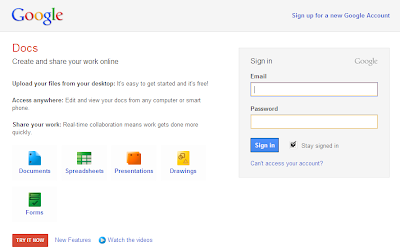
Google Docs New Log-in Page

Labels: , , , , , ,

Tag the above posting to your favorite Book-marking website:

Google | Yahoo | Windows Live | Ask Jeeves | Netscape | Digg | del.icio.us | Technorati | Newsvine | Reddit | Blinklist

Friday, August 13, 2010

#Firefox4 - Bundled with 2 Cool Features from Google Chrome

I am big fan of Firefox but still I liked Google Chrome for some basic features like,

- Tab placement
- Apps Tabs
- Installing Add-ons without rebooting browser

But now the new version of Firefox will have the first two features added.

Firefox 4 Features:

New Tab Location

[Image source: mozilla.com]


App Tabs

[Image source: mozilla.com]

And the other new features like, 'Switch to Tab' and 'Firefox Button' will add more flexibility and work area.

But I will really like if they can enable Firefox add-ons to be installed without rebooting.

What is your favorite feature and what would you like to see in the next version of Firefox?

Labels:

Tag the above posting to your favorite Book-marking website:

Google | Yahoo | Windows Live | Ask Jeeves | Netscape | Digg | del.icio.us | Technorati | Newsvine | Reddit | Blinklist

Monday, February 22, 2010

Targeting Users At Wrong #Advertising Medium? - The Online

Which is the easy, cost effective, high ROI and measurable advertising medium?

Obviously, the "Online" medium!

But the recent online activities show that the future of online advertising will be very tough!

Here is a little proof:

Note: As per the W3Schools browsers usage stats, Firefox, IE and Chrome are the top three browsers.


To show ads we need browsers capable of displaying ads. But what if the users say no to ads, then what will be next step to show ads? And how the user says "NO"!

Here is how?

What do you think the most popular browser extension/add-on for Google Chrome and Firefox?

The Ad Blocker!

Firefox Popular Add-on
Image: Firefox Popular Add-on

Google Chrome – Popular Extension
Image: Google Chrome – Popular Extension

Millions of internet users say "NO" to ads, if this is the case then how you are planning to deliver your ads to online users using one of the above mentioned popular browsers?

This question kills so many advertisers, isn't?

So what is the possible solution?

Hint: Stop bugging like "Sales Representatives", understand user requirements and deliver ads accordingly! Or the online medium will not be an easy place to advertise.


I know this may not be the actual solution! But trying to find a perfect one...

Share your thoughts too!

Labels: , , , , ,

Tag the above posting to your favorite Book-marking website:

Google | Yahoo | Windows Live | Ask Jeeves | Netscape | Digg | del.icio.us | Technorati | Newsvine | Reddit | Blinklist

Tuesday, June 30, 2009

Open Source Day: Download Latest Version of PHP and Firefox

Today, I call it as "Open Source Day". Lets party! Happy Open Source Day.

Update your browser if you are using Firefox or Replace your existing browsers with Firefox 3.5 (The Fastest)

Firefox Latest Version

Also upgrade your version of PHP to PHP 5.3.0

PHP - Latest Version

Labels: ,

Tag the above posting to your favorite Book-marking website:

Google | Yahoo | Windows Live | Ask Jeeves | Netscape | Digg | del.icio.us | Technorati | Newsvine | Reddit | Blinklist

Monday, November 10, 2008

Free Search Engine Rank Checker - Firefox Extension

Use the free extension of Firefox to check rankings in more than 5 search engines for unlimited keywords.

I don't know why still many of them use pirated/purchased rank checking tool when a free tool is available online.

Start using Firefox and explore the real internet efficiency!

Download the free Rank Checker now!!

Labels: ,

Tag the above posting to your favorite Book-marking website:

Google | Yahoo | Windows Live | Ask Jeeves | Netscape | Digg | del.icio.us | Technorati | Newsvine | Reddit | Blinklist

Tuesday, October 14, 2008

Select, Copy Text from Tables in Firefox Easily

A Quick Firefox tip to select column-text inside tables from a web-page.

If you want to select only a particular column from a table, hold Ctrl while selecting the text. Take a look at the below screen-shot, I have selected only the text excluding images in the adjacent column.


Firefox users, try it yourself!

Labels: ,

Tag the above posting to your favorite Book-marking website:

Google | Yahoo | Windows Live | Ask Jeeves | Netscape | Digg | del.icio.us | Technorati | Newsvine | Reddit | Blinklist

Friday, August 22, 2008

Firefox Shortcuts - Open Websites

Few days ago I wrote a post about mouse gestures in Firefox and Opera. Today I have listed some useful tips on how to open a website easily using Firefox.

How to open ".com" websites?

If you want to open any website with ".com", just type the domain name in the address bar and hit Ctrl + Enter in your keyboard, Firefox will append "http://www" and ".com" to complete the web address.

How to open ".net" websites?

If you want to open any website with ".net", just type the domain name in the address bar and hit Shift + Enter in your keyboard, Firefox will append "http://www" and ".net" to complete the web address.

How to open ".org" websites?

If you want to open any website with ".org", just type the domain name in the address bar and hit Ctrl + Shift + Enter in your keyboard, Firefox will append "http://www" and ".org" to complete the web address.

A quick look,

.com → Ctrl + Enter
.net → Shift + Enter
.org → Ctrl + Shift + Enter


Adding one more time saving shortcut,

How to open a website in a new window without using your mouse and without hitting "Ctrl + t"? Use the the below technique,

Step 1: "Alt + d" (this will take you to the address bar)
Step 2: type only the domain name (don't add "http / https" or ".com / .net / .org")
Step 3: Hold "Alt" and use the above shortcuts (the website will open in the new tab without disturbing your current tab)

A quick look with a example to open http://www.google.org/ without disturbing the current tab,

Alt + d (reach address bar)
google
Alt + Ctrl + Shift + Enter
http://www.google.org/ (website opened)

Easy? Try it!

Labels: ,

Tag the above posting to your favorite Book-marking website:

Google | Yahoo | Windows Live | Ask Jeeves | Netscape | Digg | del.icio.us | Technorati | Newsvine | Reddit | Blinklist

Monday, August 04, 2008

Mouse Gestures - Opera and Firefox

I wanted to share some useful mouse gestures of Opera and Firefox browsers.

Still wondering what I am talking about, read about mouse gestures here and here (Wiki)

Opera:

By default Opera comes with Mouse Gestures enabled. Try using the following,

1. To navigate between the result pages in Google, do the following,


Click and hold-down the left mouse button and right click to navigate to next result page

Click and hold-down the right mouse button and left click to navigate to previous result page

Note: This gesture will work well in all websites, depending on the link structure.

2. To close a tab, do the following,

Click the tab with the scroll wheel.


Firefox:

Download the add-on to enable mouse gesture for Firefox. Please update your Firefox browser. Download the new Firefox3!

1. To navigate back / previous in the current open tab,

Click and hold-down the right mouse button and left click to navigate to previous page

Click and hold-down the left mouse button and right click to navigate to next page

2. To close a tab, do the following,

Click the tab with the scroll wheel.

3. To navigate between the opened tabs,

Place the mouse pointer over any one of the tab and scroll


Try the above and do let me know if you have any trouble.

Labels: , ,

Tag the above posting to your favorite Book-marking website:

Google | Yahoo | Windows Live | Ask Jeeves | Netscape | Digg | del.icio.us | Technorati | Newsvine | Reddit | Blinklist