View Pratheep profile on LinkedIn
Matt Cutts

Wednesday, September 14, 2011

Google Accounts Log-in Redesign Affects Auto-fill Username / Passwords

Post Google+ launch, Google is busy redesigning most of its apps to match Google+ look and feel, and now they in the process of changing the log-in pages for most of the services and apps with the new look and feel.

Gmail New Log-in Page
The problem after redesign: saved passwords in the browser doesn't work anymore, you have to type and store it again, because with the new redesign, any log-in page is redirected to "Google Accounts" authentication URL which is different from the previous one, and most of the browsers couldn't map the username and password to the new URL.

Can Google get a quick fix to it?
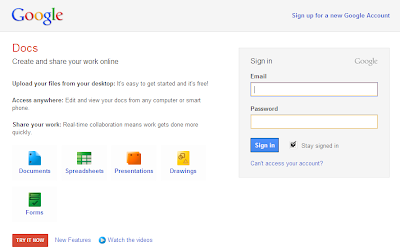
Google Docs New Log-in Page

Labels: , , , , , ,

Tag the above posting to your favorite Book-marking website:

Google | Yahoo | Windows Live | Ask Jeeves | Netscape | Digg | del.icio.us | Technorati | Newsvine | Reddit | Blinklist

Monday, August 04, 2008

Mouse Gestures - Opera and Firefox

I wanted to share some useful mouse gestures of Opera and Firefox browsers.

Still wondering what I am talking about, read about mouse gestures here and here (Wiki)

Opera:

By default Opera comes with Mouse Gestures enabled. Try using the following,

1. To navigate between the result pages in Google, do the following,


Click and hold-down the left mouse button and right click to navigate to next result page

Click and hold-down the right mouse button and left click to navigate to previous result page

Note: This gesture will work well in all websites, depending on the link structure.

2. To close a tab, do the following,

Click the tab with the scroll wheel.


Firefox:

Download the add-on to enable mouse gesture for Firefox. Please update your Firefox browser. Download the new Firefox3!

1. To navigate back / previous in the current open tab,

Click and hold-down the right mouse button and left click to navigate to previous page

Click and hold-down the left mouse button and right click to navigate to next page

2. To close a tab, do the following,

Click the tab with the scroll wheel.

3. To navigate between the opened tabs,

Place the mouse pointer over any one of the tab and scroll


Try the above and do let me know if you have any trouble.

Labels: , ,

Tag the above posting to your favorite Book-marking website:

Google | Yahoo | Windows Live | Ask Jeeves | Netscape | Digg | del.icio.us | Technorati | Newsvine | Reddit | Blinklist

Thursday, September 20, 2007

Live Search Engine New Design, Not Compatible in all Browsers

Live Search Engine - New Design, Not Compatible in all Browsers

Take a look at the below screen-shot, taken from Opera Browser. If I click “Option” near the search box, the dropdown is not showing properly. This is not Beta version, this is live, and so I hope this issue will be solved soon by MS team.


UPDATE – Google Custom Search

I got an email from Google, click here to read the complete email about “Google Custom Search Engine”. As they told before, Google has started to inform webmaster about the recent promotion and major changes in their website network.

Labels: , ,

Tag the above posting to your favorite Book-marking website:

Google | Yahoo | Windows Live | Ask Jeeves | Netscape | Digg | del.icio.us | Technorati | Newsvine | Reddit | Blinklist