View Pratheep profile on LinkedIn
Matt Cutts

Tuesday, July 12, 2011

How To Make Money Using Google+1: Spammers Trick

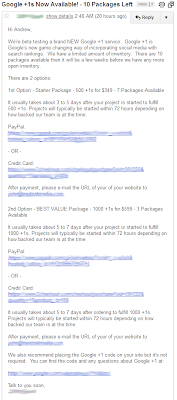
I think this must be the first spam trick for selling Google +1s. Next target is Google+ ;-)

How To Make Money Using Google+1: Spammers Trick

Labels: , , ,

Tag the above posting to your favorite Book-marking website:

Google | Yahoo | Windows Live | Ask Jeeves | Netscape | Digg | del.icio.us | Technorati | Newsvine | Reddit | Blinklist

Wednesday, July 06, 2011

Social Media Boosts Referral Traffic! Really?

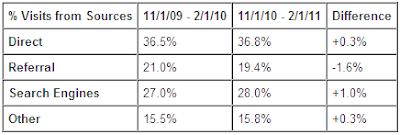
As per the recent Google Analytics benchmark report, the referral traffic has gone down by 1.6%, if this is the case how to justify that "Social Media Engagement" really helps in driving traffic to websites?

Google Analytics benchmark report

And in the other hand a report from "Search Engine Land" says, integrating your website with Social Networking sites like Facebook increase referral traffic by 300%!!
So which one of these values is exact? Any thoughts?

PS: "Social Media Engagement" may not drive enough traffic but gets business!

Labels: , , , , ,

Tag the above posting to your favorite Book-marking website:

Google | Yahoo | Windows Live | Ask Jeeves | Netscape | Digg | del.icio.us | Technorati | Newsvine | Reddit | Blinklist

Wednesday, June 22, 2011

Social Media Sites Used to Engage with Customers #Webinar #Poll via @Position2

A poll result from the Webinar by ChiefMarketer, sponsored by Position2:

Question: What social media site will you most likely be actively listening and engaging with prospects and customers?

Answer:

As expected Twitter and Facebook leads the race...
Social Media Sites Used to Engage with CustomersClick image to enlarge

Labels: , , , , , , , , , , , , ,

Tag the above posting to your favorite Book-marking website:

Google | Yahoo | Windows Live | Ask Jeeves | Netscape | Digg | del.icio.us | Technorati | Newsvine | Reddit | Blinklist

Friday, March 11, 2011

Social Cheaters: Please Follow Some Ethics [Twitter Rules]

Do you tweet? And do you follow-back all your followers? If so please save yourself from "Social Cheaters".

The History:


At early times, when search engines' ranking algorithm was powered only by back-links, people used to add reciprocal links to pass PageRank (PR) and to improve their rankings. But very few of them keep a track of their back-links and most of them will remove the reciprocal links just before the Google PageRank Dance to boost their search engine rankings and PR.

The Present:


Similar to Google PageRank for a webpage your Twitter profile has an influencer score, and to increase the score "Social Cheaters" follow the same old method. This is what they do:


  • First they will select the list of twitter accounts to follow.

  • Then they will follow each and every twitter account.

  • As soon as they 'click' follow, the twitter account holder will get an email alert saying "You got a new follower".

  • But even before the 'new follower' email alert reaches inbox, the 'Social Cheaters' will Un-follow them.

  • Most of them will follow back even without checking the followers current follow status.


By doing this I have seen most of have gained a good profile score.

Example:


I recently got a new follower alert from @buzzwave a twitter account from http://buzzwave.us.com and they have followed the same trick to gain more followers.

@buzzwave
As you can see the ratio between following and the followers is way too high. How do they attain this?
I got their follow request by 8:40 PM and I checked their twitter account by 8:50 PM, but by that time my account was un-followed.

Most of them won't check for the current status of the new followers they will simply follow back. And this is how they could easily increase their followers. A best example of poor social media ethics!

How to Prevent?


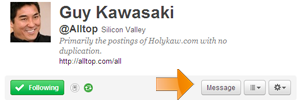
  • Before you decide to follow-back any new follower, please check for their current status. To verify the current status please check for the message button. If the message button is visible then they still follow you, if not they have un-followed you.

    Following: Following

    Not Following: Not Following


  • So what happens if they un-follow after you follow them back? Use tools like http://who.unfollowed.me/ to check your followers' status and un-follow the "Social Cheaters".

Conclusion:


It is not necessary that all un-followers are "Social Cheaters". Sometimes if your twitter timeline is spammy you will lose your followers. ;-)

Tips to keep-up your followers:

  1. Do not overload your twitter timeline even if you are posting relevant news items.

  2. Do not send spam links to your followers.

  3. Do not send DMs very frequently.


Tips: when you consider following someone:

  1. Follow only if their timeline interests you.

  2. Don't follow just for a follow-back.

  3. Do not un-follow immediately to increase your profile score.


Tips to maintain your twitter account:

  1. Check your followers' status and un-follow the "Social Cheaters". I use http://who.unfollowed.me/ to manage my list.

  2. If possible stick to specific topic while discussing on your timeline.

  3. Give credits to the original twitters, always use RT or VIA or use the default Retweet.


So what are you waiting for, start scanning your account and eliminate the cheaters.

Happy tweeting!

PS: I use http://klout.com/ to check my profile score.

Labels: , , , , ,

Tag the above posting to your favorite Book-marking website:

Google | Yahoo | Windows Live | Ask Jeeves | Netscape | Digg | del.icio.us | Technorati | Newsvine | Reddit | Blinklist

Tuesday, December 07, 2010

Bat Cave: Batman Hates #SocialMedia


Source: Agent-x

Labels: , , ,

Tag the above posting to your favorite Book-marking website:

Google | Yahoo | Windows Live | Ask Jeeves | Netscape | Digg | del.icio.us | Technorati | Newsvine | Reddit | Blinklist

Wednesday, September 29, 2010

Social Media Is All About Winning The Viral Race!

When will you say that a social media campaign is successful?

The success of a social media campaign is defined based on one major factor, i.e. "visibility".

"If you can think and construct a unique, interesting theme to market your product or service, the end result will be a successful campaign."

I have taken couple of social media virals to explain how unique and interesting your campaign should be.

Campaign from OldSpic:


This is one of the successful viral video campaigns which attracted so many social media users.

Campaign from Cisco:


Copycat of OldSpice, which is a failure and couldn’t generate enough buzz among the social media users.

Reason for Cisco's failure:

The main reason for Cisco's failure is the idea is not unique and moreover a social viral will not fit for all kinds of products and services. In this case you can’t use the same technique to sell both after-shave and networking routers

Few tips for a successful social media campaign:

1. Think unique

Copying an existing social media campaign will create another “Cisco Spice”, so think unique.

2. Consider your target audience

A brief research about your audience like, age group, gender and the geo location can help you create a campaign for your target audience

3. Interesting campaign topic, character and theme

Selecting an attractive character, name or theme is very crucial as this the entry point where it hooks the users to stop and view the viral.

4. Refresh (be active)

Any social media camping has its own expiry date; you can’t just create a campaign and expect users glued with your service always. If you don’t refresh your ideas users will keep moving.

As you can see the graph below, traffic reached the peak when Oldspice released their viral, then it become normal. Be active to keep yourself on top.


Finally, think viral! If you want to win the social media race, think and act viral.

Labels: , , , , , , ,

Tag the above posting to your favorite Book-marking website:

Google | Yahoo | Windows Live | Ask Jeeves | Netscape | Digg | del.icio.us | Technorati | Newsvine | Reddit | Blinklist

Wednesday, July 21, 2010

Free Social Media Monitoring Tool - Do It Yourself

How important is to monitor social media?

It is time to go beyond your regular website analytics! Why? Using traditional website analytics you can only measure activities that are happening after the user enters the website. But how can you monitor users’ activity outside the website, I mean the activities and comments that they are publishing across the social media networking websites?

Social media monitoring tools are expensive. But there are plenty available...

There are plenty of social media monitoring tools available but most of them are still in the learning phase and yet to build a comprehensive solution. Moreover their costing won’t work for little start-up companies. But social media monitoring is required for all kinds of business who use online media to promote their services and products, how large or small the business is, doesn’t matter.

A Simple Zero-cost Solution

So what can be a possible zero cost solution? After doing a small research I have come up with a simple plan to easily monitor your users’ activity across all major social media websites.

How social media monitoring tool works?

Before I being the process, I just what to give an introduction on how traditional social media monitoring tool works. The process is pretty simple as the search engine workings. The challenge is to define different indexing and search algorithm for various kinds of social media websites. For example a video streaming website like YouTube has to be indexed very differently when you compare with a discussion forum.

How social media monitoring tool works?
How to build our own social media monitoring tool?

As per the flow-diagram we need three different modules to create our own tool. Let us begin with the first module “INDEX”.

INDEX

Oh wait! No need to worry about buying a server cloud. It is already built for us; we have to just use it. It is nothing but the “Google” INDEX. Google has a massive indexing engine which can index millions of blogs, forums, news and many other websites and segregates it algorithmically.

As our initial step we use Google index to build our indexing module. To start the indexing module we have to define the types of social media websites to be indexed. And here is the list,

- Blogs
- Discussion Forums
- News
- Videos and
- Micro Blogging (Twitter)
- LinkedIn
- Facebook

And here is how we build our indexing engine.

- Use Google Blog search and news search to follow the activity in Blogs and News respectively
- Use Google alerts to follow recent activity in forums, videos, LinkedIn and Facebook
- To follow twitter activity use its own search

It may be vague at this point of time, but once we build our complete system it will be fun using it.

The second module, “SEARCH”

SEARCH

The search module will not only help searching the network it also helps to segregate data collected from various sources in a unique form.

The unique form of data is “RSS Feeds”. Here is how you generate RSS feeds for various kinds of social media websites.

- To generate a RSS for blog index, go to Google blog search and search for the keyword you want to monitor (tip: it can be your brand name, product, services or competitor’s brand) and save the feed URL (I prefer Atom).

Google Blog Search
- To generate a RSS for Forum index, go to Google Alerts and type the keyword you want to monitor and select the options as shown below,

Google Alerts
Create alert and save the feed URL.

- To generate a RSS feed for video follow the same process as you did forum, but select the type of alert from the list accordingly.

- To generate a RSS for News, go to news.google.com and search for the keyword and save the feed URL

- To generate a RSS feed for micro blogging (Twitter), go to twitter.com and search for the keyword you want to monitor and save the feed URL (shown below)

Twitter Search Result with Feed URL
- To generate RSS feed for Facebook and LinkedIn, go to Google Alerts and enter the search term with a prefix “site:facebook.com” and “site:linkedin.com” respectively and save the result as RSS feed

Now we have generated different feed URLs which can search and fetch updated results from the indexing engine.

Next and last module is the “RESULTS” module

RESULTS

Add all the feed URLs to Google reader and rename the subscription for easy identification.

Renamed Feeds in Folders
Now the tool is almost ready to monitor. Give at-least a day to pull results from all RSS feeds.

The following reporting/engagement features are now readily available:

Email – send useful and interesting post
Tag – for search and easy access
Share it with note – an easy-share with your views
Star – mark important or favorite items
Send to – re-tweet or post it to various other social media websites with single click (go to reader setting and enable it under “send to” tab)

Now take a look at the tool’s work-flow, I have tried matching it with the traditional social media monitoring tools,

Free social media monitoring tool flow diagram
Click here to download a step-by-step tutorial.

There are few limitations in this tool when you compare it with an enterprise level monitoring tool. And if you are really looking for one comprehensive tool, try Position2’s Brand Monitor.

Meanwhile, I will analyze and add more stuff to enhance the free social media monitoring tool.

Labels: , , , ,

Tag the above posting to your favorite Book-marking website:

Google | Yahoo | Windows Live | Ask Jeeves | Netscape | Digg | del.icio.us | Technorati | Newsvine | Reddit | Blinklist

Thursday, July 30, 2009

Micro Blogging vs. Traditional Blogging

"Micro blogging is a form of multimedia blogging that allows users to send brief text updates or micromedia such as photos or audio clips and publish them, either to be viewed by anyone or by a restricted group which can be chosen by the user" – Wikipedia

Consider the two major social media websites (especially well know for micro blogging) "The Facebook" and "The Twitter". Of course LinkedIn leads the list, but I am not considering it for this discussion as it is completely a professional networking site.

In the recent times micro blogging have great impact on traditional blogging. Take a look at the below screenshots,

Alexa - Time Spent on Blogger Facebook and Twitter
Google Trends

Google Trends
The first graph is from Google Trends comparing the search volume of Blogger, Twitter and Facebook.
The second graph is from Alexa comparing the average time spent on these websites.

It is clear that micro blogging overtook the traditional blogging. People spend more time and interact much in micro blogs. The number of traditional blogs create on an average is comparatively less when compared to number of new users and new interactions that is happening in micro blogs.

So what will be the future of traditional blogging? Should I start a community/group/page in Facebook to save the traditional blogging - "Save the Traditional Blogging"? – Just Kidding!

While the chase is happening among micro blogging and traditional blogging, in the recent issue of Business Standards newspaper there is an article which talks about social media websites (especially Facebook, Twitter and LinkedIn) helping companies to generate leads, traffic, resource and business. Adding more negative impact to traditional blogging!

PS: The last previous paragraph in the above business standards article is quoted by me :-)

Labels: , , , , , , ,

Tag the above posting to your favorite Book-marking website:

Google | Yahoo | Windows Live | Ask Jeeves | Netscape | Digg | del.icio.us | Technorati | Newsvine | Reddit | Blinklist