View Pratheep profile on LinkedIn
Matt Cutts

Wednesday, September 21, 2011

A Question from Matt Cutts to Google Webmaster Help :-)

Q: How do reconsideration requests work at Google?

A:

Labels: , ,

Tag the above posting to your favorite Book-marking website:

Google | Yahoo | Windows Live | Ask Jeeves | Netscape | Digg | del.icio.us | Technorati | Newsvine | Reddit | Blinklist

Sunday, December 16, 2007

Webmaster Tool Update

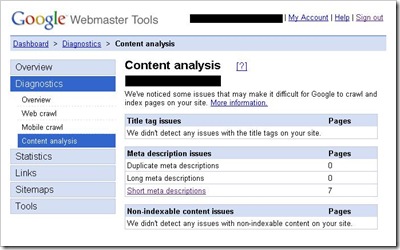
Google has updated the webmaster tool. Please take a look at the below screen-shot,
webmaster_tool_content_analysis

Under "Diagnostics" menu, they have added a new sub-menu, "Content Analysis". In this section they track all the issues in the website related to title, meta tags and non-indexable content.

The tool helps to do a proper on-page optimization for the websites. It analyses title and meta tags and generate a report for all repeated, short and missing tags. Also, it analysis the website content and display the reason for non-indexable content. Using these reports we can fix the SEO tags and content for the website.

Sing-in to get the benefits from Google Webmaster Tool. Still the developers were working on this tool and they will add more cool stuff in the coming year, 2008. Check the webmaster tool frequently to get the update.

Also there is an update in Google Analytics (this is again a free tool from Google where you can measure your website’s traffic for free). Now, we can compare results which will be displayed as a graph. For example, you can compare "Page Views" with "Traffic (Visits)" and generate a graph to analysis it. Login to get the updates! Note: This is still in beta testing mode and will be live very soon.

Labels: , , ,

Tag the above posting to your favorite Book-marking website:

Google | Yahoo | Windows Live | Ask Jeeves | Netscape | Digg | del.icio.us | Technorati | Newsvine | Reddit | Blinklist

Saturday, October 20, 2007

Google Webmaster Tool - Crawl Rate Update

This is one of the best tools from Google; using this tool we can track some of the website's activities like, "top queries", "crawling rate", "index details", "links details" and much more.

These facilities are available from the day they launched this tool, but what is actually new in this? Before I explain, take a look at below screenshot of my Google’s Webmaster Tool admin page.


Under "Tools" menu we have an option "Set Crawl Rate", here you can actually see the Google bots activity. It will show you two main things,

1. Googlebot activity in the last 90 days
2. Your current speed

1. The activity report they will show the details of, number of pages crawled, number of kilobytes downloaded and time spent downloading a page.

The Update Is:

2. In the speed section, you will actually have three options to select your website's crawl rate by Googlebot. Usually, the "Faster" option will be in disabled mode and no one can activate it, unless if Google feels that the crawl rate is very low for your website, they will automatically enable it as shown above. The faster crawl rate will automatically expire after 90 days from the day it was activated.

In the screenshot you can actually see the note from Google, stated just below "Faster".

Does anyone experience the same situation? Please comment.

Labels: ,

Tag the above posting to your favorite Book-marking website:

Google | Yahoo | Windows Live | Ask Jeeves | Netscape | Digg | del.icio.us | Technorati | Newsvine | Reddit | Blinklist