Recently Microsoft has released software which supports few Google products. Among that software I like “Windows Live Mail” and “Windows Live Writer”.
You can get the LIVE software package from Microsoft at http://get.live.com/wl/desktop
This particular posting is for those who is trying to use the “Live Writer” to edit the “Google Blogger”. Some of them have tried and started commenting that Live Writer is NOT working for Blogger. Yes this is true, but this particular post will help you to setup “Windows Live Writer” for “Google’s Blogger”.
Please follow the steps carefully and you can get your Blogger running in Live Writer :)
Step1:
Download and install “Windows Live Writer” at http://get.live.com/writer/overview
Step2:
After installing, open it from the installed programs list and you will get the following screen,
And then the following screen,
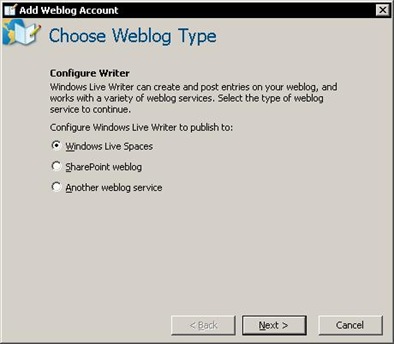
After you get this, select the third option i.e. “Another weblog service”, and click next.
Step3:
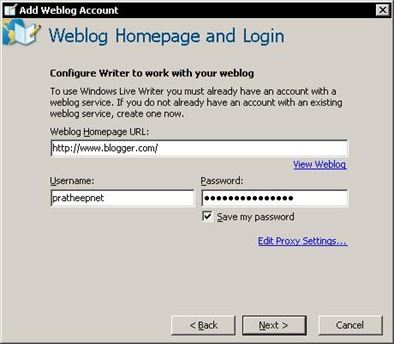
In the above screen, fill the details as shown above. But you should enter your user name and password for Blogger, just kidding ;)
Click next,
Step4:
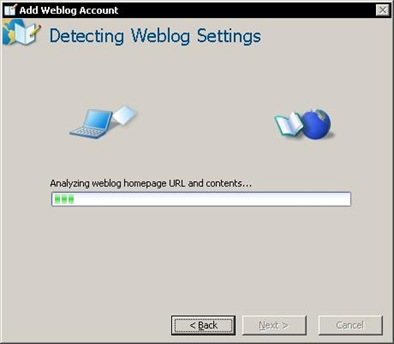
Live Writer will try to configure your Blogger account, but unfortunately it can’t...
You will get the following screen,
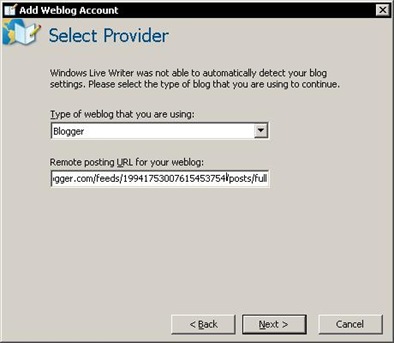
Now select the “Weblog Service Provider” as “Blogger”
As soon as you select the server provider you will get the following URL in the remote posting URL field,
http://www.blogger.com/feeds/<feed-id>/posts/full
Note: please take a look at the steps very carefully.
Now, open your Blogger's profile in a browser, the URL will be something like this,
http://www.blogger.com/profile/19941753007615453754
Copy only the numbers from the URL (i.e. in the above URL I will copy “19941753007615453754”) and replace <feed-id> in the remote posting URL field and click next.
Note: Please make sure that you have not edited the entire URL except replacing <feed-id>.
You will get the following screen; this screen will take some time, because it will download your complete Blogger setting to your local computer.
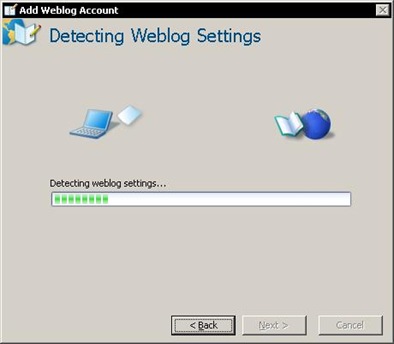
Click next,
Step5: (Final)
Click "Finish"
Hurray! You have configured your Blogger to “Windows Live Writer”.
Note: this particular posting was published through the “Live Writer”
I can recommend this software, as this is very easy to use. Some of its positive points are,
1. You will actually type in Blogger interface and not in a regular Blogger editor
2. Instant preview, even you don’t need Internet to preview it
3. Formatting is as simple as you do in MS Word
4. Spell Check before publishing
5. Save and publish when you are connected to Internet
6. Synchronize with online Blogger whenever required
7. Add nofollow tag and target window for links very easily
So, what else you are looking for, just start posting into Blogger through Live Writer.
Thanks to Microsoft for this tool!
Labels: Google Blogger, Live Update, Windows Live Writer